
위 버튼을 통해 VitalTrack 앱 페이지로 이동 할 수 있습니다.
VitalTrack APK는 사용자가 VitalTrack 장치를 통해 수집된 생체 신호 및 움직임 데이터를 실시간으로 모니터링할 수 있도록 도와주는 안드로이드 전용 애플리케이션입니다.
이 애플리케이션은 VitalTrack 장치와의 블루투스 연결, 데이터 수집, 저장 및 시각화 기능을 제공합니다.
1. VitalTrack 앱 사용법
1.1 앱 초기 설정
1.1.1 블루투스 활성화
앱을 실행하기 전에 스마트폰의 블루투스를 활성화해야 합니다. 이는 설정 메뉴에서 할 수 있습니다. (설정 경로: 설정 > 블루투스 또는 빠른 설정 패널에서 블루투스 아이콘을 터치하여 활성화합니다.)
1.1.2 앱 실행
VitalTrack 앱을 실행합니다. 처음 실행할 때 블루투스 권한 및 위치 접근 권한을 요청할 수 있으므로 허용해 주세요.
1.2 장치 연결
1.2.1 장치 검색 및 페어링
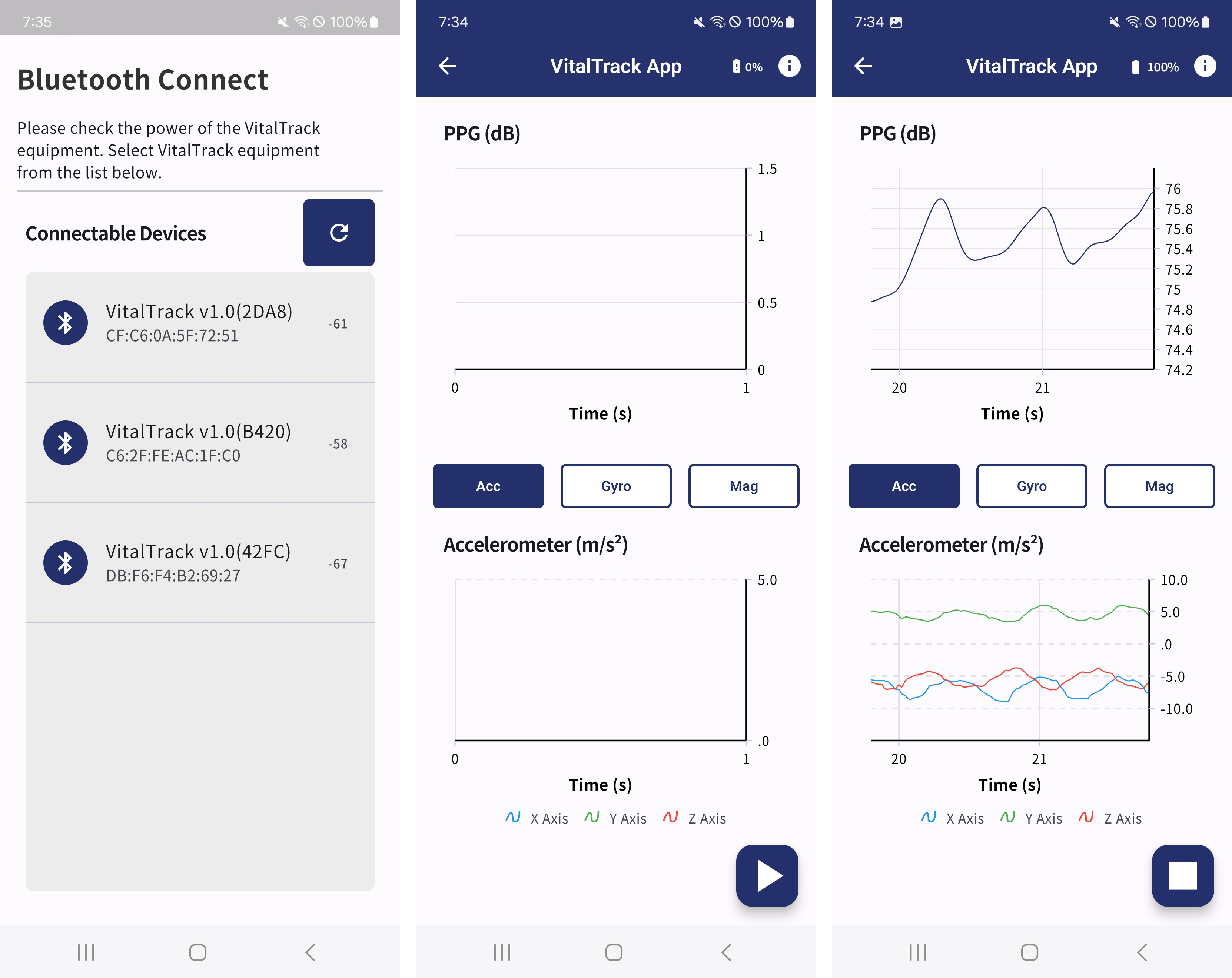
VitalTrack 앱에서 장치 검색을 시작합니다. 앱이 근처의 VitalTrack 장치를 검색하여 리스트에 표시하면, 해당 장치를 선택하여 페어링을 완료합니다.
1.3 데이터 수집 및 시각화
1.3.1 데이터 수집 시작
앱에서 측정 시작 버튼(우측 하단 재생 모양의 플로팅 버튼)을 누르면 VitalTrack 장치로부터 실시간 데이터 수집이 시작됩니다. 수집된 데이터는 그래프로 시각화되어 화면에 표시됩니다.
1.3.2 PPG 데이터 확인
PPG(Photoplethysmography) 데이터를 실시간으로 그래프 형태로 확인할 수 있습니다. 이는 사용자의 혈류 변화를 감지하고 측정하는 데 사용됩니다. PPG 데이터는 혈류의 맥동에 따라 변화하는 혈액량을 나타냅니다.
1.3.3 IMU 데이터 확인
IMU(Inertial Measurement Unit) 데이터를 실시간으로 확인할 수 있습니다. 가속도계, 자이로스코프, 자력계 데이터를 통해 사용자의 움직임을 추적합니다.
1.3.4 데이터 저장
앱에서 측정 정지 버튼(우측 하단 정지 모양의 플로팅 버튼)을 누르면 측정이 정지되며 측정 시작 이후 수집된 데이터는 스마트폰 내부 저장소에 자동으로 저장됩니다. 저장된 데이터는 PC와 연결하여 다음 경로에서 확인할 수 있습니다:
저장 경로: Android Device\내장 저장공간\Android\data\com.newert.vital_track_app\files