
Use the button above to open the VitalTrack app page.
VitalTrack APK is an Android application that lets users monitor biosignal and motion data collected from a VitalTrack device in real time.
The application provides Bluetooth connectivity to VitalTrack devices as well as data collection, storage, and visualization.
1. Using the VitalTrack App
1.1 Initial App Setup
1.1.1 Enable Bluetooth
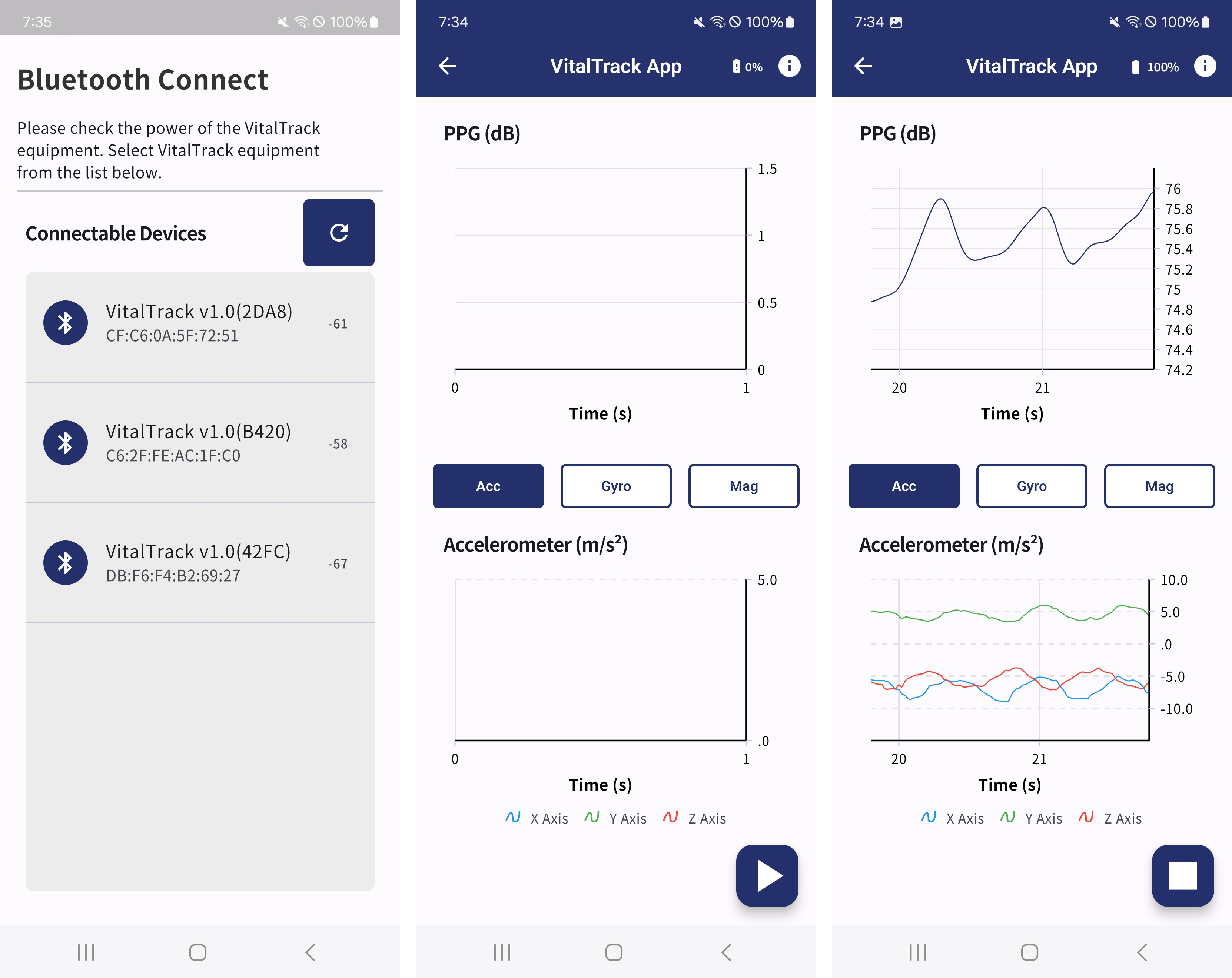
Enable Bluetooth on your smartphone before launching the app. You can do this in the Settings menu. (Path: Settings > Bluetooth, or tap the Bluetooth icon in the Quick Settings panel.)
1.1.2 Launch the App
Launch the VitalTrack app. On first launch, the app may request Bluetooth and location permissions; please allow them.
1.2 Connect the Device
1.2.1 Search for and Pair the Device
Start a device search in the VitalTrack app. When the app finds nearby VitalTrack devices and displays them in a list, select your device to complete pairing.
1.3 Data Collection and Visualization
1.3.1 Start Data Collection
Press the Start Measurement button (the play-shaped floating button at the bottom right) to begin collecting real-time data from the VitalTrack device. The collected data is visualized as graphs on the screen.
1.3.2 View PPG Data
View PPG (photoplethysmography) data as a real-time graph. PPG is used to detect and measure changes in blood flow, representing variations in blood volume with each pulse.
1.3.3 View IMU Data
View IMU (Inertial Measurement Unit) data in real time. Accelerometer, gyroscope, and magnetometer data are used to track the user's movement.
1.3.4 Save Data
Press the Stop Measurement button (the stop-shaped floating button at the bottom right) to stop the measurement. Data collected since the measurement started is automatically saved to the smartphone's internal storage. Connect the phone to a PC to access it at the following path:
Save location: Android Device\Internal storage\Android\data\com.newert.vital_track_app\files